arrow_backBack to Portfolio
PackScan: PDF Document Scanner & Editor for iPhone iconFast document scanner and PDF editor

Turn paper into clean PDFs.

PackScan detects document edges, straightens pages, and gives you practical tools to edit, organize, sign, watermark, and export PDFs on iPhone.

PackScan: PDF Document Scanner & Editor for iPhone app icon

PackScan

Scan in seconds

Auto scanPDF editorMulti-page PDFText recognitionSignaturesWatermarksAuto scanPDF editorMulti-page PDFText recognitionSignaturesWatermarks

Features

A complete scanner in your pocket

Scan documents automatically, correct perspective, edit and reorder pages, recognize text, add signatures or watermarks, and export clean multi-page PDFs.

document_scanner

Automatic Capture

Detect edges, wait for a stable frame, and correct perspective for clean pages.

edit_document

Flexible Page Editor

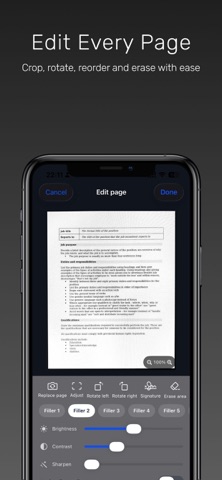
Crop, rotate, replace, reorder, filter, erase, sign, and watermark document pages.

folder_copy

Organized Exports

Create folders, recognize text, and save or share polished multi-page PDFs.

App Store Screenshots

Real App Store previews

PackScan: PDF Document Scanner & Editor for iPhone App Store screenshot 1
PackScan: PDF Document Scanner & Editor for iPhone App Store screenshot 2
PackScan: PDF Document Scanner & Editor for iPhone App Store screenshot 3
PackScan: PDF Document Scanner & Editor for iPhone App Store screenshot 4
PackScan: PDF Document Scanner & Editor for iPhone App Store screenshot 5
PackScan: PDF Document Scanner & Editor for iPhone App Store screenshot 6
PackScan: PDF Document Scanner & Editor for iPhone App Store screenshot 7
PackScan: PDF Document Scanner & Editor for iPhone App Store screenshot 8
PackScan: PDF Document Scanner & Editor for iPhone App Store screenshot 9
PackScan: PDF Document Scanner & Editor for iPhone App Store screenshot 10

Workflow

From page to PDF in moments

photo_camera

Step 1

Capture a document

Let automatic edge detection frame and scan each page.

auto_fix_high

Step 2

Polish the pages

Correct corners, apply filters, and add signatures when needed.

picture_as_pdf

Step 3

Export the PDF

Reorder pages, name the document, then save or share it.

Leave the paper pile behind.

Download PackScan to capture, polish, organize, and share documents without leaving your iPhone.