arrow_backBack to Portfolio
OmniFrame: Dual Camera & Multi-Format Video Recorder iconVideo tools for modern creators

One take. Every frame you need.

OmniFrame records front and rear cameras together, or turns one take into separate landscape and portrait videos ready for every platform.

OmniFrame: Dual Camera & Multi-Format Video Recorder app icon

OmniFrame

Create every angle

Dual cameraDual formatPicture in PictureSplit screen4K videoCreator libraryDual cameraDual formatPicture in PictureSplit screen4K videoCreator library

Features

Capture more from every take

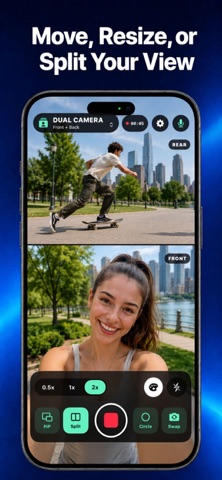
Record front and rear cameras together, or create landscape and portrait videos from one take with PiP, split layouts, filters, zoom, and up to 4K.

cameraswitch

Dual Camera

Record front and rear cameras together with movable PiP or a clean split-screen layout.

aspect_ratio

Dual Format

Create separate 16:9 landscape and 9:16 portrait files from the same recording.

video_library

Creator Library

Preview, rename, share, download, and organize every saved video from one place.

App Store Screenshots

Real App Store previews

OmniFrame: Dual Camera & Multi-Format Video Recorder App Store screenshot 1
OmniFrame: Dual Camera & Multi-Format Video Recorder App Store screenshot 2
OmniFrame: Dual Camera & Multi-Format Video Recorder App Store screenshot 3
OmniFrame: Dual Camera & Multi-Format Video Recorder App Store screenshot 4
OmniFrame: Dual Camera & Multi-Format Video Recorder App Store screenshot 5
OmniFrame: Dual Camera & Multi-Format Video Recorder App Store screenshot 6
OmniFrame: Dual Camera & Multi-Format Video Recorder App Store screenshot 7
OmniFrame: Dual Camera & Multi-Format Video Recorder App Store screenshot 8
OmniFrame: Dual Camera & Multi-Format Video Recorder App Store screenshot 9
OmniFrame: Dual Camera & Multi-Format Video Recorder App Store screenshot 10
OmniFrame: Dual Camera & Multi-Format Video Recorder App Store screenshot 11
OmniFrame: Dual Camera & Multi-Format Video Recorder App Store screenshot 12

Workflow

Record once, publish anywhere

tune

Step 1

Choose a mode

Pick Dual Camera or Dual Format for the shot you need.

fiber_manual_record

Step 2

Capture the take

Use filters, zoom, flash, microphone controls, and up to 4K quality.

ios_share

Step 3

Save every format

Review the loop, then keep either output or save both to Photos.

Stop recording the same moment twice.

Download OmniFrame and create camera-ready videos for widescreen and short-form platforms in one streamlined workflow.